Edit a CSV without losing IDs
Small CSV cell edits where exact identifiers and quoted fields matter.
Seven synthetic rows were checked. This does not establish large-file performance or every converter’s behavior.
What you can use it for
- csv conversion
- json conversion
- data transformation
Edit CSV fields without changing identifiers
Small, targeted edits where leading zeros, long identifiers and quoted text must survive saving.
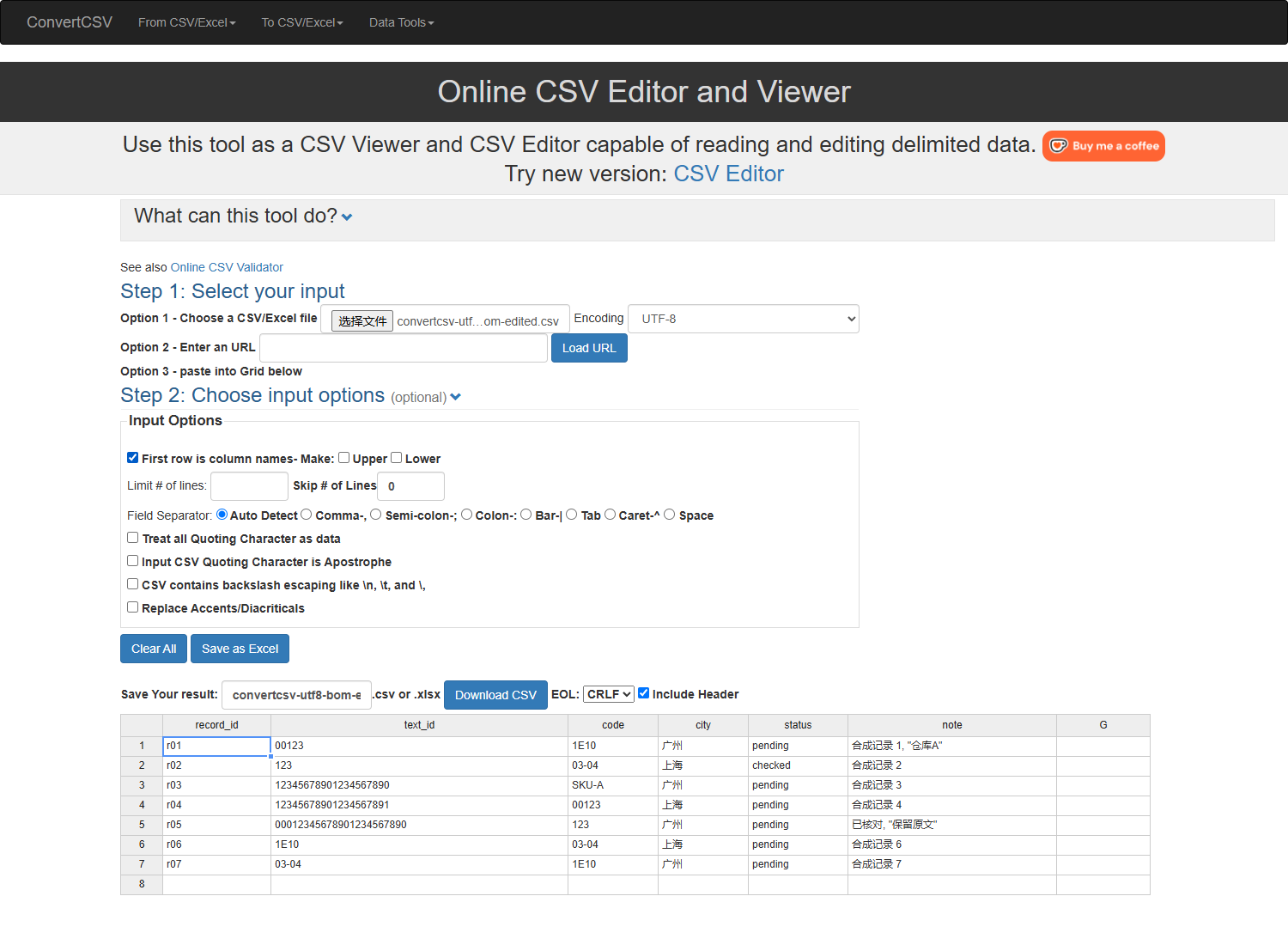
CSV Viewer and Editor tested on 10 October 2026 with seven synthetic rows, two encodings and two specified edits. Not a test of every ConvertCSV utility.
A short workflow
- Keep a source copy and make a small sample containing long IDs, leading zeros, commas and quotes.
- Open the CSV Viewer and Editor, save once without editing, then change only the intended cells.
- Download and reopen the edited CSV. Compare full field values and row count, not just the screen formatting.
Before you start
Did the saved file preserve the test values?
All four tested saves passed strict parsing and full field comparison. Verify your own file before replacing its source.
Can this repair digits already lost in a spreadsheet?
The test does not establish recovery. Return to the original source when values have already changed.
Notes based on evidence checked .
Before you choose
General feature limits remain unverified; see the task-specific test below.
Edit CSV without changing identifiers
On 10 October 2026, ConvertCSV’s CSV Viewer and Editor preserved all 7 rows × 6 fields in our small synthetic test. Both UTF-8 inputs (with and without BOM) were saved unchanged, then with exactly two edits; all 4 downloaded CSVs passed independent field comparison and application reopen checks. We used comma, a header row, UTF-8 and standard double-quote parsing. This does not test every ConvertCSV converter or large files.
This check covers one small synthetic table and the specified CSV editing route. It does not verify every product feature, large-file performance or recovery of values already changed elsewhere.
Edit CSV: Keep Leading Zeros and Long IDs — settings, exact field checks, actual exports and alternatives.
Task verification and evidence
Third-party CSV editing tests with one synthetic table. Tested 10 October 2026. ConvertCSV passed this sample; TableConvert 3.0.1 failed the tested CSV-to-CSV route. Original failed exports are preserved.
These checks apply to the stated inputs and route. General pricing, platform and processing fields keep their own source dates and unknown values.
About this listing
Official sources reviewed on . These general listing fields are based on public product information. The task-specific test above has its own scope and limits; it does not verify all product features.
Features and plans change. If something here is out of date, suggest a correction.